SSD Solid State Drive

What is SSD Solid State Drive
 

An SSD, or solid-state drive, is a type of storage device used in computers. This non-volatile storage media stores persistent data on solid-state flash memory. SSDs replace traditional hard disk drives (HDDs) in computers and perform the same basic functions as a hard drive. But SSDs are significantly faster in comparison. With an SSD, the device's operating system will boot up more rapidly, programs will load quicker and files can be saved faster.A traditional hard drive consists of a spinning disk with a read/write head on a mechanical arm called an actuator.


Benefits of SSD Solid State Drive
 

Durability and reliability of an SSD
Heat is a major cause of failures in hard drives, and enough heat is generated by the continual motion of an HDD’s moving parts to cause it to break down over time. Since an SSD doesn’t have such parts, it can maintain a lower temperature with much higher performance. An SSD is also better able to handle drops, shakes, shocks and everyday wear and tear, making it less apt to experience data loss.


SSDs are faster than hard drives
SSDs offer shorter boot times for your computer, more immediate data transfer and higher bandwidth. Faster speeds mean SSDs can handle data at the ultra-high speeds necessary in today’s business world, especially when running programs that access large amounts of data such as an operating system. Also, SSDs are very stable, which ensures that stored data is secure.


Power and energy efficient
Since an SSD has no moving parts, it needs less power to operate compared to an HDD with a magnetic spinning disk. Energy efficiency is a big benefit in using an SSD when it comes to PC and mobile devices where battery longevity is a highly marketable and requested feature.


Less weight and no noise
Their smaller size allows SSDs to weigh less than larger HDDs with their magnetic heads and metallic disks. Their compact design makes SSDs perfect for laptops, tablets and other small electronic devices.


First 12 Last 1/2

Why Choose US
 
Nvme Ssd
 

Innovation

We are dedicated to improving our systems continually, ensuring that the technology we offer is always cutting edge.


Advanced equipment

Equipment based on the latest technological developments has higher efficiency, better performance and stronger reliability.

ODM SSD
USB FLASH DRIVE 3.0
 

Professional team

Our professional team collaborate and communicate effectively with one another, and are committed to delivering high-quality results. They are capable of handling complex challenges and projects that require their specialized expertise and experience.


One stop solution

From the begining inquiry and throughout the entire process until you receive the goods. we are dedicated to supporting you every step of the way.

USB FLASH DRIVE 2.0


Types of SSD Solid State Drive

2.5-Inch Sata Ssd

This is the most common SSD type and should be compatible with the widest range of PCs, even old ones. “2.5-Inch” refers to the form factor of the SSD enclosure, 2.5-inch SSDs use SATA bandwidth and connectors. Because of this, they should be compatible with any PC or laptop that’s already using a hard drive.

M.2 Sata Ssd

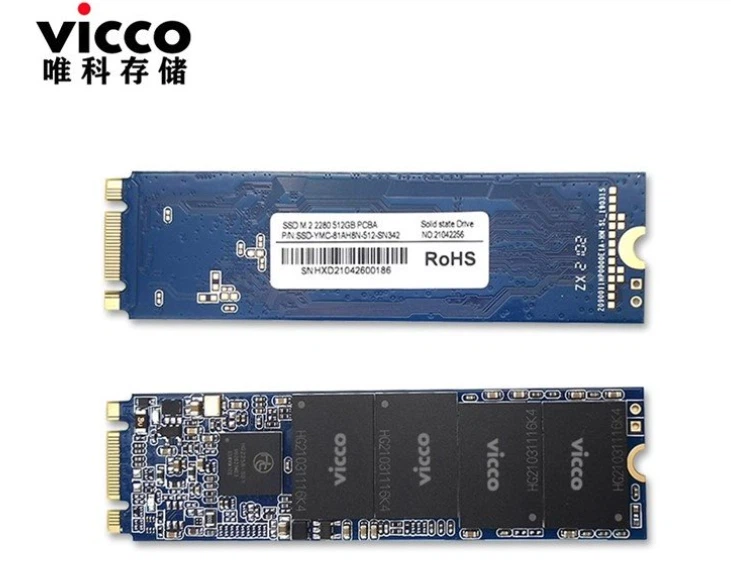
M.2 drives can come in a few different sizes, but the main standard is M.2 2280. The “22” means that the M.2 drive is 22 millimeters wide, whereas the “80” means that the M.2 drive is 80 millimeters long.If you aren’t sure how to quantify this, just think of M.2 drives as extremely thin USB thumb drives they’re about that length, usually.

productcate-731-563
productcate-733-554

M.2 Nvme Ssd

NVMe SSDs exclusively use the M.2 form factor discussed above, but with a catch: they are no longer using SATA bandwidth.NVMe SSDs can achieve industry-leading storage performance while remaining extremely compact and straightforward to install.

Pcie Nvme Ssd

It can deliver up to 3,500 MB/s read and 3,000 MB/s write speeds, which means that you can expect lightning-fast boot times, quick file transfers, and snappy application launches.


Components of SSD Solid State Drive


Good Die SSD

Device driver

Software created by the OEM to run on the target host processor family under a particular OS and File System. Some SSDs have a small amount of DRAM cache that stores frequently accessed data for faster access.The device driver provides host access the particular SSD product.

SSD PCBA

SSD controller

The electronic component that provide SSD device level interfacing and firmware execution. Included is an embedded processor, data ROM, data RAM, flash component interfacing, error correction code, wear leveling TRIM, and security features.

Otg Mudp

Controller firmware

Software written and stored in electrically erasable memory for execution by the controller. Can be upgraded once in service.Some advanced techniques include NCQ, TRIM, and wear leveling.It manages data transfer, error correction, wear-leveling, and other functions.

USB PCBA

Flash memory components

Individual Flash die or devices using either NAND or NOR technology. Densities vary from 2GBytes to 64GBytes.These are memory chips that store data. They are made up of floating-gate transistors and use electric charges to store and retrieve data.SSDs may use SATA, PCIe, or M.2 connectors to connect to the computer.


Application of SSD Solid State Drive
 
 
Business

Companies depending on programming environments or data analysis often rely on SSDs, as access times and file-transfer speeds are critical.SSDs are used in personal computers and laptops as a primary storage device. They offer faster boot and load times, and improve overall system performance.

 
Game program

For every gaming program the computer requires a faster data access speed enabling a faster load time which is provided by the SSD.SSDs have become increasingly popular in gaming consoles as they offer faster loading times, which improves gameplay experience.

 
Smartphones

SSDs are used in mobile devices such as smartphones, tablets and digital cameras to provide faster data transfer speeds and longer battery life.With the continuous developments in Smartphone industry, the need for small sized fast memory is best fulfilled by SSD.

 
Servers

SSDs are used in servers and data centers as they can help to reduce power consumption and offer higher speeds for data processing and storage.SSDs can improve the server’s response time due to its speed. They are suitable for faster read and write operations.


USB FLASH DRIVE 3.0 PCBA


How SSD Solid State Drive Works

SSD (Solid State Drive) works by storing data on non-volatile flash memory chips or RAM modules. Unlike traditional hard drives, which use spinning magnetic platters to store and retrieve data, SSDs have no moving parts. Because the drive heads must align over an area of the disk in order to read or write data, and the disk is constantly spinning, there's a delay before data can be accessed. The drive may need to read from multiple locations in order to launch a program or load a file, which means it may have to wait for the platters to spin into the proper position multiple times before it can complete the command. If a drive is asleep or in a low-power state, it can take several seconds more for the disk to spin up to full power and begin operating.The hard drive industry introduced smaller platters, on-disk memory caches, and faster spindle speeds to counteract this trend, but mechanical drives can only spin so fast.


How to maintain SSD Solid State Drive
 

Don’t wipe the drive
Assuming you are using an operating system that supports TRIM, you never need to overwrite or “wipe” the free sectors. This is important when using a mechanical drive, as files are not deleted immediately. Mechanical drives will be marked as deleted, but until they are overwritten, data can still be recovered.
Update your firmware
SSD manufacturers issue firmware updates throughout the lifetime of the solid state drive. Though the goal is to provide a product that is ‘set it and forget it,’ manufacturers sometimes need to release updates that can address technical issues and bugs. Sometimes a firmware update can even offer a performance enhancement and better drive reliability.
Don’t store large files
The ideal file types that should be stored on an SSD are ones that need to be accessed quickly and frequently. Operating system files and program files are perfect for this. In a world of Netflix and Spotify, storing large files like movies or your music collection on your hard drive are a thing of the past. Storing files like these on an SSD not only takes up what little space it may have, but also will see no performance gain. It is not a good idea to store your media collection on a solid-state drive, as you will not notice if your media files are played from an HDD or SSD.
Don’t fill to full capacity
SSDs may suffer performance issues, especially in writing speed, when the drive reaches full capacity. It is easier for the drive to write to an empty cell when there is free space available. When the drive is full, the SSD needs to find out which blocks are partially filled, move that information into a cache and then write it back to the drive.


Certification


productcate-311-437
productcate-311-439
productcate-311-439


FQA


Q: What is the solid state drive SSD?

A: A solid-state drive (SSD) is a new generation of storage device used in computers. SSDs store data using flash-based memory, which is much faster than the traditional hard disks they've come to replace.

Q: Is a 256GB SSD better than a 1TB hard drive?

A: An SSD offers faster read/write speeds, consumes less power, generates less heat, and is more shock-resistant. On the other hand, a 1TB HDD provides a much larger storage capacity at a lower cost. So, the choice depends on your specific needs.

Q: What is the main purpose of an SSD?

A: SSDs replace traditional hard disk drives (HDDs) in computers and perform the same basic functions as a hard drive. But SSDs are significantly faster in comparison. With an SSD, the device's operating system will boot up more rapidly, programs will load quicker and files can be saved faster.

Q: How do I know if my SSD is installed?

A: Type Device Manager.Click Device Manager.Double click Disk Drives.View the hard drives listed below.

Q: Can a laptop have both SSD and HDD?

A: Yes, without giving any second thought, you can seamlessly use SSD and HDD together in a single system. In the previous days, HDD was always the first choice for storing a large amount of data. Still, with the advancement in technology, multiple types of storage media appeared, and one such storage media is SDD.

Q: What lasts longer HDD or SSD?

A: The lifespan of an SSD is significantly longer than that of an HDD. While HDDs tend to last around 3-5 years, SSDs can last up to 10 years or more. This is because SSDs have no moving parts, whereas HDDs have spinning disks that can wear down over time.

Q: Can I change HDD to SSD?

A: Replacing an SATA Hard Drives with an SSD Drive is not as difficult as it initially sounds. If you want to switch from HDD to SSD, you can do so in just a few steps. Reinstalling the operating system or cloning the old drive is also very easy. Speed up your computer and replace your old HDD with a modern SSD variant.

Q: How much SSD is good for a laptop?

A: It differs a lot if you just want to install your operating system on the SDD or if you actually want to work from the drive. 250GB: operating system, entertainment, and backups. 500GB: entertainment and business use. 1TB: business use, gaming, and photography.

Q: Will SSD make my laptop faster?

A: If your laptop has a hard disk drive (HDD), consider upgrading it to a solid state drive (SSD). An SSD can speed up your everyday tasks by up to six times as they use flash memory instead of the moving parts in HDDs, allowing the computer to find files faster.

Q: What is the lifespan of a SSD?

A: Since SSDs don't have moving parts, they're very reliable. In fact, most SSDs can last over five years, while the most durable units exceed ten years. However, how long your SSD will last depends on how often you write data into it, and you could use that to estimate the lifespan.

Q: How do I install a new SSD in my computer?

A: Gather the parts and tools. Unplug the PC and open the case.Return the drive caddy or screw the drive in place. Connect a SATA data cable to a SATA data port on the motherboard.Plug the SATA power and SATA data connectors into the SSD. Close the case and initialize the drive.

Q: Where to install an SSD?

A: The two most common options for installing the drive in a PC is either to put it in a drive cage or to secure it to the case itself. Drive cages usually have some sort of method to attach the drive to the tray, and the tray slides into a cage. You can attach a SATA SSD directly to your desktop case.

Q: How do I know how much SSD my laptop has?

A: File Explorer is a tool that allows users to view and manage files and folders on their computer. To check the size of an SSD in File Explorer, open File Explorer and select the drive you want to check. On the right side of the window, you will see the size of the drive.

Q: Do all laptops use the same SSD?

A: It really depends on the laptop size. Some houses a 2.5″ drive and M2 SSD (Note: there are different types of M2 SSDs) and some houses a single M2 or even double. There are those mSata drive that do exist for ultrabooks.

Q: Is SSD important for laptop?

A: That's the power of an SSD. SSDs also enable “instant-on” performance — the ability for your system to boot almost immediately. Because SSDs don't have to mechanically seek out data on a moving platter (as a hard drive does), they help your system achieve instant-on performance.

Q: Can SSD last 20 years?

A: While it's theoretically possible for an SSD to last 20 years, it's highly unlikely in real-world scenarios. Most consumer-grade SSDs are designed with an endurance rating that specifies the total amount of data that can be written to the drive before it starts to degrade.

Q: How do I fix my SSD on my laptop?

A: Use a USB cord to connect the external enclosure with the SSD to your laptop. Windows should automatically detect your external SSD. If Windows doesn't detect the SSD drive, press Win+X, then click "Disk Management". Right-click the SSD drive and click "Initialize disk".

Q: Is SSD permanent storage?

A: Both SSDs and HDDs are permanent storage media for electronic devices, and both are types of non-volatile memory. That means they retain your files even when the system's power is turned off.

Q: Why is SSD necessary?

A: Social media platforms provide a powerful channel for reaching and engaging with a large audience,which can help increase brand awareness and recognition. Engaging with customers through social media channels can help build stronger relationships and foster customer loyalty.

Q: How does an SSD work a level?

A: Solid-state drives (SSDs) consist of NAND flash memory cells and a controller that manages the structure of data on the drive. The memory cells store information by trapping electrical charge. Data is stored on SSDs in pages, which are combined to form blocks​.


We're well-known as one of the leading ssd solid state drive enterprises in China, specialized in providing high quality OEM service. Please rest assured to wholesale bulk high-grade ssd solid state drive at competitive price from our factory.

128gb internal ssd for laptop, cf to micro sd adapter, memory card storage

(0/10)

clearall